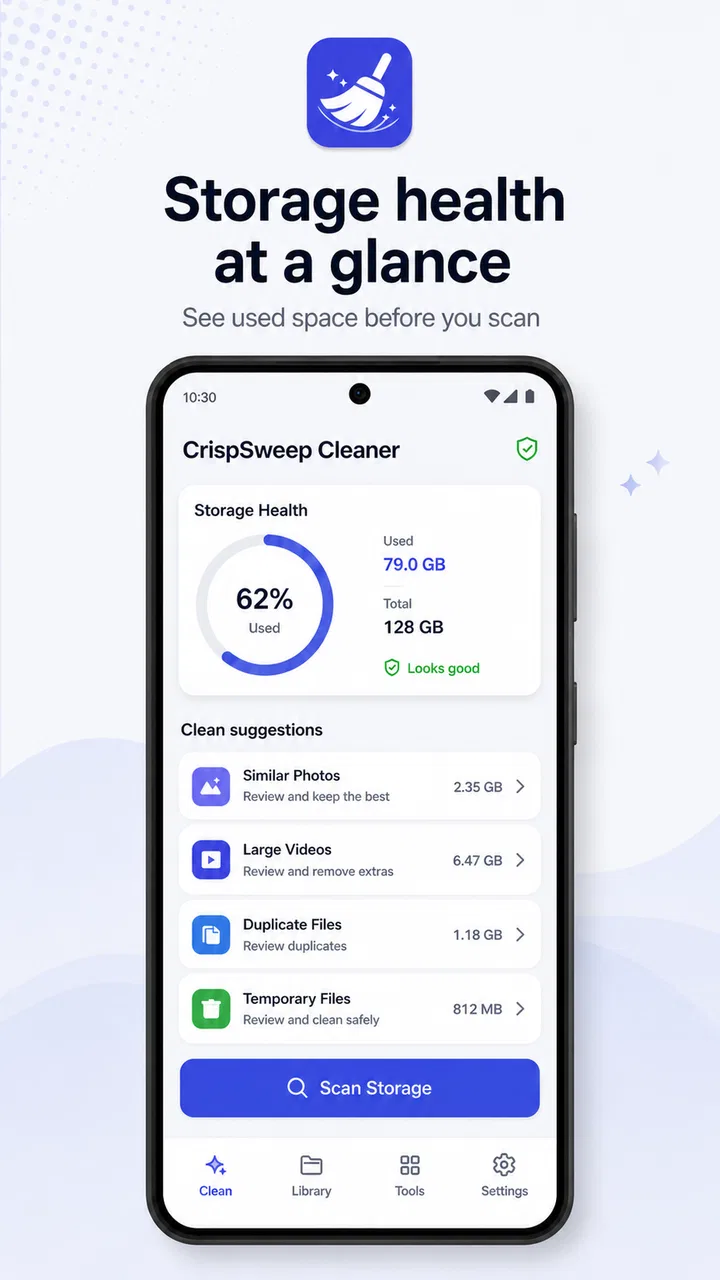
CrispSweep Cleaner
- 4.4
- Rating
- 10.00K
- Installs
- Free
- Price

 Analysis by App-foxy
Cleaning a phone sounds simple until the task turns into a long sequence of opening folders, checking thumbnails, deleting one item, and then trying to remember where the next batch is hiding. CrispSweep Cleaner takes a more focused approach: it scans your media and the folders you choose, then lets you review what it finds before removing selected items. I found that basic workflow more useful than a dramatic “one tap” promise because it keeps the final decision in my hands.
This is a free productivity app from Vouch Vault, aimed at people who want a clearer way to deal with clutter rather than a broad collection of unrelated phone tools. Its age rating is Everyone, and the current release is version 3.0.1. The app has reached over ten thousand installs and holds a 4.4 average from twenty-nine ratings, with five written reviews. Those figures suggest a small but interested user base, so I approached it as a practical utility rather than a mature all-purpose maintenance suite.
The most important thing to understand is that CrispSweep Cleaner is a review-before-cleanup tool. It does not replace your judgement with an automatic purge. That makes it appealing when your storage contains personal photos, work files, downloaded images, or folders that look messy but still matter. It also means the quality of the experience depends on how patiently you inspect the results.
You May Also Like

 AccuWeather: Weather Radar
AccuWeather Review: A Quick, Clear Forecast for Everyday Decisions
For everyday plans, the best forecast is the one you can understand quickly. AccuWeather makes rain timing, radar, and local conditions easy to act on, with a few trade-offs.

 Hill Climb Racing
Why Hill Climb Racing Still Turns Crashes Into One More Run
A tiny car, a bumpy hill and one more upgrade: Hill Climb Racing keeps resurfacing because its simple chaos makes every near-miss feel personal.

 AliExpress - Shopping App
AliExpress Makes Global Shopping Feel Personal, but Shoppers Bear the Risk
AliExpress turns a global marketplace into a pocket-sized discovery engine. Its reach is useful, its shopping loop compelling, and its trade-offs easy to miss.

 Lords Mobile: Kingdom Wars
Lords Mobile Is a Kingdom-Building Routine, Not a Quick Match
A case-by-case verdict on the building, battles, device demands, and social commitments that make Lords Mobile rewarding for some players and exhausting for others.

 PDF Scanner app - TapScanner
TapScanner Makes Paperwork Easier to Capture, Check, and Share
TapScanner makes scanning with a phone feel less like a rescue operation and more like a dependable step in getting work done. Its capture tools are useful, though not flawless.

 Block Blast!
 Shows How Much a Puzzle Game Can Leave Out
A quiet grid game shows why puzzle players increasingly value instant clarity, repeatable skill and low-pressure play—and where the genre still needs to catch up.
More From Our News Desk
View All News


How CrispSweep Cleaner fits into a connected mobile routine
I find CrispSweep Cleaner easiest to place when I think of it as one step in a larger phone routine: it can help me inspect clutter, while other apps and services may hold the context that tells me what is safe to remove. In this section, I’ll look at how those handoffs affect a cleanup and why a little preparation can make the final choices less rushed.
Scanning is useful, but the network is not the main event
The central activity happens around media and selected folders on the device. In my normal use, the important question was not whether the phone had a fast connection, but whether the app could examine the locations I wanted to tidy and present them clearly enough for a safe decision. That distinction matters. A cleaner can feel slow or inconvenient even with excellent connectivity if its local review process is confusing, while a straightforward interface can remain useful when the network is busy.
There are still connected moments around any modern phone-cleaning routine. I might be moving between a cloud-backed gallery, a messaging service, and local storage while deciding what can go. A picture that appears disposable in one place may be the only local copy of something I need later. CrispSweep Cleaner is most helpful when I use it as the inspection stage in that larger routine, not as permission to delete anything that looks familiar.
I would start a scan when I have enough time to look through the results rather than launching it while rushing out the door. The app’s store summary describes scanning media and chosen folders, followed by reviewing and cleaning selected items. That sequence is important: the scan identifies candidates, but the cleanup remains a deliberate second step. For a phone full of screenshots, forwarded images, and old downloads, this separation makes the process feel less reckless than a bulk-clean button.
Why chosen folders are more useful than a blanket sweep
The option to work with folders is one of the more practical details here. A broad media cleanup can mix holiday pictures with temporary images, work documents, and family videos. By choosing a folder, I can narrow the job to a known problem area, such as a downloads location or a folder used by a messaging app. That creates a safer workflow: finish one category, check the result, and only then decide whether another location deserves attention.
This is also where the app is more specific than many generic storage claims. A person who wants to protect important camera memories can begin with disposable-looking areas instead of scanning everything at once. Someone preparing a phone for a trip can inspect downloaded media separately. Someone managing a work device can review a project folder without treating personal media as part of the same cleanup session.
My tip is to use a folder boundary as a decision boundary. If I already know that a particular location contains temporary material, I can be more decisive there. If a folder mixes irreplaceable files with duplicates or old exports, I slow down and treat every item as a separate choice. This small change in habit reduces the chance of deleting something simply because it appeared beside genuine clutter.
Where the mobile context changes the experience
Phone cleaning is rarely done at a desk. It happens while waiting for transport, before taking new photos, or after a warning that storage is becoming uncomfortable. CrispSweep Cleaner suits short, contained sessions better than a vague promise to “organize everything.” I can choose one problem area, review the candidates, and stop without turning the task into a full digital spring-cleaning project.
That convenience has a trade-off. A small screen makes visual checking more important and more tiring, especially when many similar images appear together. I would not treat a quick glance as enough for personal media. The app’s review stage is valuable precisely because it gives me a chance to distinguish an accidental duplicate from a slightly different photo that I actually want to keep.
A realistic example is a phone used for school or work. After several weeks, the downloads folder may contain presentation exports, reference images, screenshots, and files that were only needed once. I would scan that chosen folder first, review the results while connected to a reliable network if I needed to consult another service for context, and remove only the items I could identify confidently. The network helps with my surrounding workflow, but the cleanup decision should remain grounded in what is on the phone.
Connectivity, interruptions, and recovering safely
Any mobile task can be interrupted by a call, a low-battery warning, an app switch, or an unreliable connection. I would plan around that by treating scanning and deletion as separate checkpoints. If I am interrupted during inspection, I prefer to return to the app and verify the selected items again rather than assuming that an unfinished session has completed exactly as intended.
This is a broader strength of the app’s concept: it does not make speed the only measure of success. A slower, visible review is easier to recover from than an unexplained automatic cleanup. Still, users should keep their own recovery habits. Before a large session, I would make sure important files exist where I expect them to, avoid cleaning during a rushed moment, and begin with a limited folder rather than the entire media collection.
When connectivity is unstable, I would avoid building a workflow that depends on immediately checking another app or service for every file. Instead, I would use CrispSweep Cleaner to identify the local candidates, pause when I need more context, and return when I can make a confident choice. That approach avoids confusing a network interruption with a storage problem.
The same caution applies after a cleanup. I would not assume that a successful-looking selection means every personal backup, gallery view, or synchronized service has changed in the way I expect. The safest habit is to verify the result in the relevant place before starting another large scan. This is not a criticism unique to CrispSweep Cleaner; it is simply the sensible way to handle files that may appear in more than one part of a connected phone.
Using it without wasting data
Because the main job concerns media and selected folders, I would use the app in a data-conscious way. Scanning a local collection is different from uploading it, and users should avoid assuming that a cleaner needs to send personal files anywhere just because the phone is online. I would review the app’s permission prompts carefully, grant access only when needed for the folders I intend to inspect, and avoid cleaning sensitive locations casually.
For people on a limited mobile plan, the practical approach is simple: do the cleanup while connected to a trusted network when the surrounding task involves cloud galleries, messaging services, or backup checks. That keeps the review process from becoming tangled with unexpected data use elsewhere. It also gives me a calmer environment for comparing files instead of making deletion decisions in a hurry.
One useful workflow is to divide maintenance into three passes. First, inspect a known temporary folder. Second, remove only clearly disposable items. Third, check the remaining storage and decide whether another folder is worth the attention. This is more controlled than repeatedly scanning everything, and it prevents the app from becoming a ritual that consumes time without improving the phone.
Another non-obvious trade-off is between thoroughness and confidence. A wide scan may reveal more candidates, but it can also create a larger review burden. A narrow scan may leave some clutter untouched, yet it is easier to validate. I prefer the narrow approach for family photos and work material, while a broader pass makes more sense for folders whose contents are already temporary by nature.
Compared with the usual alternatives
The usual alternatives fall into three groups: the phone’s built-in file manager, a gallery app, and aggressive storage cleaners that try to automate as much as possible. A file manager is often better when I need to rename, move, or organize files manually. A gallery is better when the problem is selecting favorite photos, editing memories, or arranging albums. CrispSweep Cleaner is more focused when the immediate goal is to scan selected locations and review items specifically for cleanup.
Compared with an automatic cleaner, its review-first approach is the main reason I would choose it. Automation can be convenient for obvious temporary files, but personal media is rarely obvious enough to trust blindly. The cost is that CrispSweep Cleaner asks me to participate. If I want a single command that handles everything while I do something else, this is probably not the right style of tool.
It also does not sound like a complete replacement for storage analysis. Someone who wants detailed breakdowns, duplicate management across every service, backup controls, or broader device diagnostics may be happier with a more specialized application or the phone’s own storage settings. CrispSweep Cleaner makes more sense for a defined cleanup job than for users seeking an all-in-one command center.
Who will get the most from it
I would recommend it to people whose phones accumulate clutter in recognizable places: downloaded images, screenshots, exported files, or media folders that grow quietly over time. It is especially suitable for users who want to inspect before deleting and who prefer a small, understandable workflow over a crowded toolbox.
It can also work well for someone helping a family member tidy a phone. The chosen-folder approach gives the session a clear boundary, and the review step creates an opportunity to explain each decision. That is safer than handing over an automatic cleaner and hoping its categories match the person’s habits.
I would skip it if my main need were advanced file management, photo editing, cloud-backup administration, or a fully automated cleanup. I would also skip it when I am unwilling to review results carefully. The app’s value comes from controlled selection; without that part, its central advantage disappears.
Small habits that make the app safer and more effective
- Start with a disposable-looking folder: use a location where the purpose of the files is already clear before moving toward mixed personal media.
- Separate inspection from deletion: scan first, review calmly, and treat the cleanup action as a second decision rather than an automatic conclusion.
- Use connectivity for verification, not impulse: if another service is needed to identify a file, wait for a dependable connection instead of guessing.
- Stop after a completed category: finishing downloads or screenshots gives a clearer result than chasing every possible item in one session.
- Recheck important locations afterward: confirm that the files you meant to keep are still where you expect them before beginning another pass.
These habits reveal the app’s real character. It is not simply about making a storage number look better. It is about turning an untidy collection into a set of manageable decisions. That can feel slower than a one-tap solution, but it is a worthwhile exchange when the files have personal or practical value.
My verdict on the connected cleanup experience
After using CrispSweep Cleaner as a focused productivity utility, I see its strongest point in the way it combines scanning with human review. The ability to work through media and chosen folders gives me more control than a vague full-device purge, while the free price makes it easy to try without committing to a paid maintenance suite. Vouch Vault has kept the concept direct, and the current version presents a clear reason to exist.
The limitations are equally clear. It is not the best answer for people who want deep file administration, extensive backup tools, or effortless automation. The mobile screen can make a large review tiring, and connected phone habits still require care when files may exist in galleries, downloads, or online services at the same time. I would not rush through a cleanup simply because the app makes scanning convenient.
For me, the connectivity verdict is positive but measured: the app belongs in a connected routine, yet it should not be treated as dependent on constant online activity without checking the details of the particular workflow. Its useful contribution is local organization through deliberate review. If your phone’s clutter is concentrated in folders you can identify and you want to remain responsible for every deletion, CrispSweep Cleaner is a sensible, low-friction place to start. If you want the phone to make all the decisions, choose a different kind of cleaner.
Overall, I would recommend CrispSweep Cleaner to a friend who keeps postponing cleanup because the usual alternatives feel too broad or too aggressive. I would tell that friend to begin with one folder, stay patient during the review, and use the app as a careful filter rather than a magic storage button. That is where it feels most useful, and where its straightforward design earns its place on an Android phone running version 8.0 or later.
FAQs for CrispSweep Cleaner
01What is CrispSweep Cleaner and what does it do?
CrispSweep Cleaner is a mobile utility designed to help organize and clean up storage on a smartphone. It may scan for temporary files, cached data, duplicate or similar photos, large files, and other items that can consume space. After reviewing the scan results, you can usually choose what to remove instead of deleting everything automatically. The exact tools may vary depending on your device and app version.
02Is CrispSweep Cleaner safe to use on Android or iPhone?
CrispSweep Cleaner can be useful when its recommendations are checked carefully before cleaning, but users should not treat any cleaner as completely risk-free. Review selected photos, videos, documents, and downloads before confirming deletion, particularly if the app identifies similar or duplicate files. On iPhone, system restrictions can limit what third-party cleaners are able to remove. Always keep important files backed up before using cleanup features.
03Does CrispSweep Cleaner really improve phone performance?
CrispSweep Cleaner may free storage by removing unnecessary files, which can make a device feel less crowded and help when storage is nearly full. However, it cannot solve every performance problem. Deleting cache or unused files will not replace system updates, removing problematic apps, or restarting the phone. Be cautious of claims promising dramatic speed improvements, battery extensions, or instant optimization, since results depend on the device and the condition of its storage.
04Can I recover files deleted with CrispSweep Cleaner?
Recovery depends on the type of file removed, your operating system, and whether the item was sent to a recycling or recently deleted folder. Photos may remain recoverable through the device’s gallery or cloud backup for a limited period, while temporary files and cache data are often permanently removed. Before tapping the final cleaning button, inspect the selected items carefully and create a backup of anything important. Do not assume every deleted file can be restored.
05Is CrispSweep Cleaner free, and does it require special permissions?
CrispSweep Cleaner may offer basic cleaning tools for free while reserving advanced scans, unlimited cleanup, or additional features for a subscription or one-time purchase. Check the current store listing for pricing, trial terms, and renewal conditions before downloading. The app may request access to photos, media, files, or storage so it can analyze content. Grant only permissions that match the features you intend to use, and review privacy information before allowing access.
Pros
- Quickly identifies large files and duplicate photos.
- Simple interface that is easy for first-time users.
- Helps organize cluttered media libraries efficiently.
- Useful filters make file selection more convenient.
- Can free storage without requiring advanced technical skills.
Cons
- Cleaning results depend heavily on the permissions you grant.
- Some suggested files may require careful manual review.
- Deep scans can take longer on devices with large libraries.
- Extra features may be limited or tied to in-app purchases.
- Performance and available tools can vary between Android and iOS.

CrispSweep Cleaner
Gallery